Quickstart: your first Voice Agent conversation, in minutes
What you will learn: turn on the agent, write its greeting and notes, and test it without placing a real call.
Prerequisites: an account in the portal, and a Standard or AI plan for live AI minutes. The dry run below needs no live minutes.
Four steps
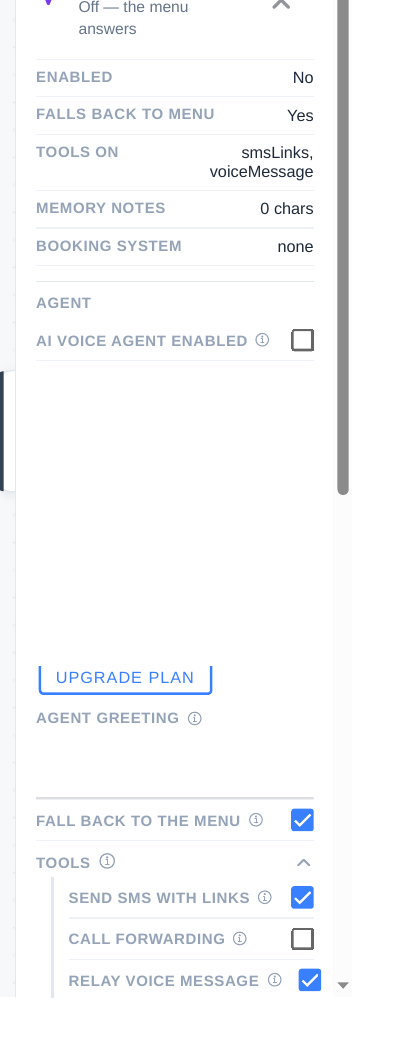
- Turn the agent on. In the portal, open Assistant, click the AI Voice Agent node, and turn it on there. Decide whether it answers all calls, or the Phone Tree answers first — in the panel this is shown as FALL BACK TO THE MENU.
- Write the greeting and notes. Greeting: who you are and how you can help. Notes: hours, service area, services, and pricing rules — written as rules, not essays.
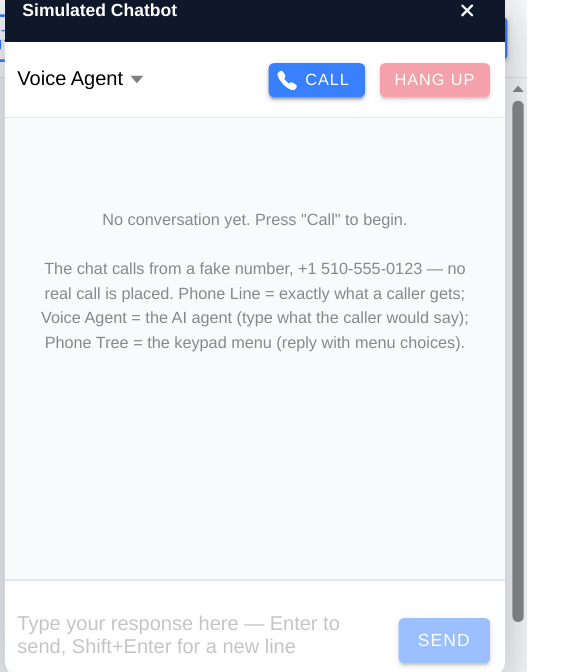
- Talk to it in Simulated Chatbot. From the AI Voice Agent panel, choose TRY IT IN SIMULATED CHAT — FREE. This is a dry run with no real call placed. Ask about hours, ask about pricing, ask for an appointment, and give a ZIP outside your area. Say something it should handle, and something it should not.
- See what happened. Open the conversation you just had: the transcript, what the agent decided at each turn, and the recording where available. Fix the notes where it guessed, and re-test.
Then give it a number: once the agent answers properly in Simulated Chat, attach your number — or forward your published number to your Plivo number — and make a real test call from a second phone.
Next steps
- Voice Agent setup — greeting and memory
- Voice Agent tools — booking, ZIP, SMS, and transfer
- Review calls and improve — turn real calls into fixes