Voice Agent tools: booking, ZIP, SMS, and transfer
The agent is only as useful as the tools you let it use. Turn on what you need, test each one, and leave off anything you would rather handle yourself.
Tools you can toggle per organisation
- Business hours: the agent answers “are you open?” from your real hours, not from a guess.
- Services and pricing: answers from your services list and pricing policy, volunteering pricing only when a caller asks, unless your notes say otherwise.
- ZIP service-area check: standard, extended (a travel fee may apply), or outside your area — before promising a visit. Note: this check is set in the Appointment node's BOOKING tab, not in the AI Voice Agent panel.
- Live booking availability: lists booking services and checks real openings before saying whether an appointment can be scheduled.
- Send a website link by SMS: after trying to help on the call, and only after the caller says yes and confirms the number. Maximum two texts per call, and only to your own website.
- Take a message: records name, callback number, and message for staff.
- Transfer to a human: connects the caller to a real person, as a last resort or when they ask for one.
Connect booking
- Choose your booking system in the AI Voice Agent panel, under TOOLS → BOOKING INTEGRATION. EasyAppointments and Acuity are supported; in the account captured here it was set to None.
- Use a different booking system? Contact our sales department at admin@ivr.solutions to discuss integration — do not assume the agent can read a system it has not been connected to.
- Test a booking request for a service you offer, a service you do not offer, and a time that is already taken. The agent must check live availability in all three cases, not quote typical hours.
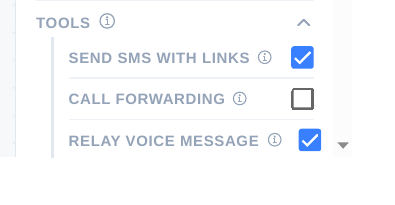
Control SMS and transfers
- Turn SEND SMS WITH LINKS on only if you want callers sent to your website by text. If you prefer everything to happen on the call, leave it off.
- Set CALL FORWARDING and the staff number for transfers, and the rule for when it may be used. A transfer that is too eager will ring you for questions the agent could have answered.
- Test a transfer from Simulated Chat and from a real call, and confirm the caller reaches a person, not another menu.
Tip: Booking answers must come from the live booking check, not from typical hours or a temporary closure notice. If a test shows the agent guessing, turn that tool off until booking is connected correctly.
Checklist
- Each tool toggled deliberately, not left on by default
- Booking tested for offered, unoffered, and taken slots
- SMS and transfer rules tested