Test the Voice Agent, and understand the fallback
Test before you go live, and know what callers experience when AI minutes run out — because that moment will happen, and it should feel like a handover, not a failure.
Step 1 — Try Simulated Chat first
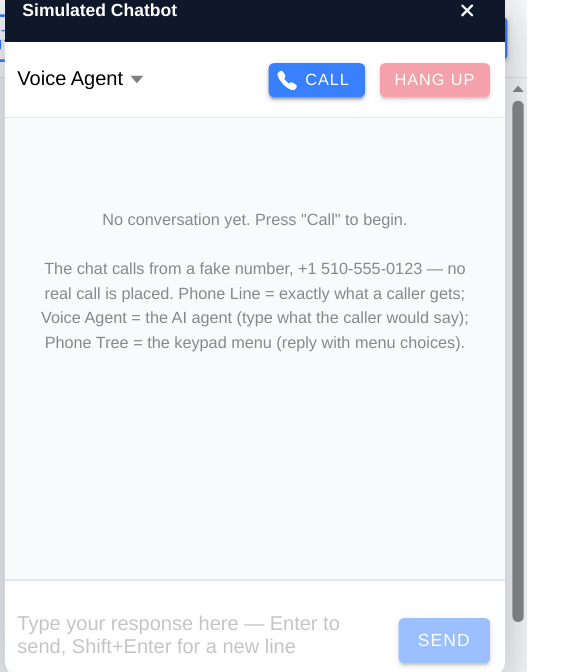
- In the portal, open Assistant, click the AI Voice Agent node, then TRY IT IN SIMULATED CHAT — FREE. This opens the Simulated Chatbot panel. This is a dry run — no real call is placed.
- Play a caller: ask about hours, ask about pricing, ask for an appointment, and give a ZIP outside your area.
- Check that every answer matches your notes and your live booking check. Fix the notes where the agent guessed, and re-test.
- Try the awkward cases: a caller who interrupts, a caller who asks for a person, and a caller who changes their mind mid-booking.
Step 2 — Make a real test call
- Call your number from a second phone and run the same script.
- Listen for pauses, misheard names, and ZIP codes. If the agent mishears a ZIP, the service-area answer will be wrong — that is the most common real-world error.
- Check call history and messages in the portal after the call. What the portal recorded should match what you heard.
Step 3 — Understand the fallback and minutes
- Fallback: if AI minutes or balance run out, calls fall back to the Phone Tree automatically. Callers still get a menu, messages, and booking help — never a dead line.
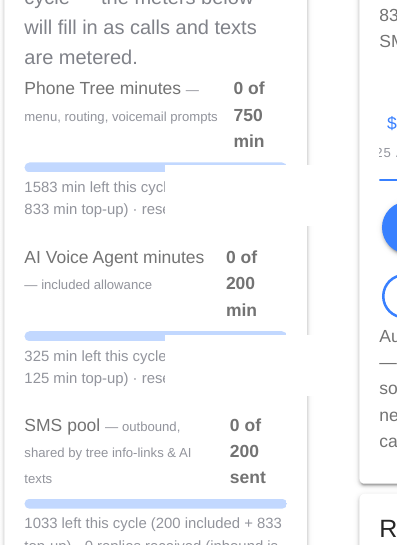
- Included minutes: Standard includes 200 AI minutes a month; AI includes 1,000. Phone Tree minutes are separate, with their own overage rules on the Pricing page.
- Top-ups: prepaid top-ups of $25 or $50 never expire, and turn the AI back on. Paid plans can also auto-recharge — check your Usage page to see which is set for your organisation.
- Check usage: review your Usage page regularly in the first month. If you are consistently near the limit, a plan change is cheaper than repeated top-ups.
Tip: After any change to hours, pricing, or booking, re-run Simulated Chat once. It takes two minutes and catches the change that would otherwise reach a real caller first.
Checklist
- Simulated Chat tested for hours, pricing, booking, and outside-area ZIP
- Real test call completed and checked in call history
- Fallback understood by everyone who answers the phone
- Usage page checked