Phone Tree nodes: hours, ZIP, appointments, and messages
Once the basic menu works, add the nodes that make the tree useful when you are busy, closed, or out on a job.
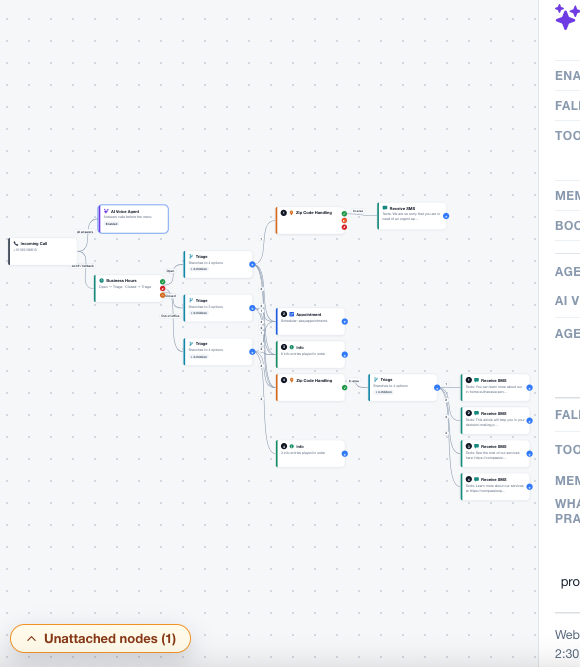
Business hours and out-of-office
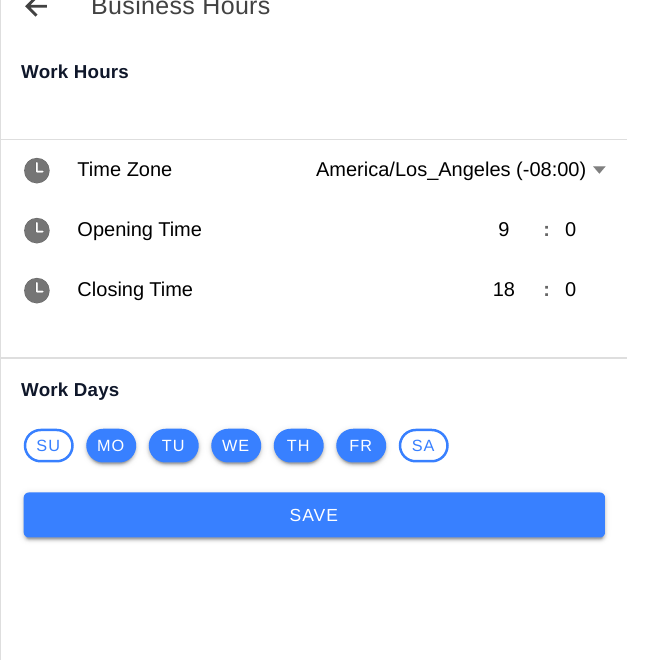
- Set your weekly working days and one opening and closing time for those days, and your timezone. In the portal this is Dashboard → Business Hours, labelled Work Days, Opening Time, Closing Time, and Time Zone.
- Choose where closed callers go: a closed message, a callback option, or the same menu with availability hidden.
- Add an out-of-office branch for holidays or closures, with its own message and return date if you know it. See the full walkthrough: Set an out-of-office window.
- Test by calling outside hours — or by temporarily setting a test window — and confirm the closed message plays.
ZIP service-area screening
- In Assistant, open the Appointment node, then its BOOKING tab, then SERVICE AREA. Enter your standard-area ZIP codes in SERVICE AREA ZIP CODES, then your extended-area ZIP codes in EXTENDED SERVICE AREA ZIP CODES if you charge a travel fee there. ZIP checking is not in the AI Voice Agent panel.
- Write three messages: in-area (normal booking), extended-area (note the fee, then booking), and outside-area (polite decline, plus any non-visit option you offer).
- Test with one ZIP from each group. Never let the tree guess a ZIP — it must check the list.
Appointment, info, message, and forwarding nodes
- Appointment: reads live availability, lets the caller hear the next slot, skip a day, or repeat, then sends an SMS registration link. The appointment is not confirmed until the caller completes the form.
- Info: reads services and pricing scripts you control. Keep each script focused on one topic.
- Collect reasons: asks why the caller is calling, so you can follow up with context.
- Leave voice message: records a message and stores it in the portal for staff to return.
- Receive SMS: sends a text to the caller, and can also text staff to follow up.
- Forward to mobile: connects the caller to a live person, usually as a last resort or when they ask for one.
Tip: A node that does nothing — no message, no next step — is a hang-up. Give every branch an exit.
Checklist
- Hours, closed, and out-of-office branches tested
- Standard, extended, and outside ZIP messages tested
- Appointment flow tested end to end
- Voicemail and messages checked in the portal