Phone Tree basics: build your first menu
The Phone Tree is the keypad menu callers hear when they dial. A good tree answers the two questions most callers ask — availability and pricing — and gets the rest to a message or a person.
Step 1 — Write the greeting first
Example, adapted to your business:
“Thank you for calling Riverside Mobile Vet. To hear our availability and to request an appointment, press 1. To listen to a list of our services, press 2. If you want us to call you back, press 3. To hear these options again, press 0.”
Keep it to three or four options. Every extra option is another chance for a caller to hang up.
Step 2 — Build the triage
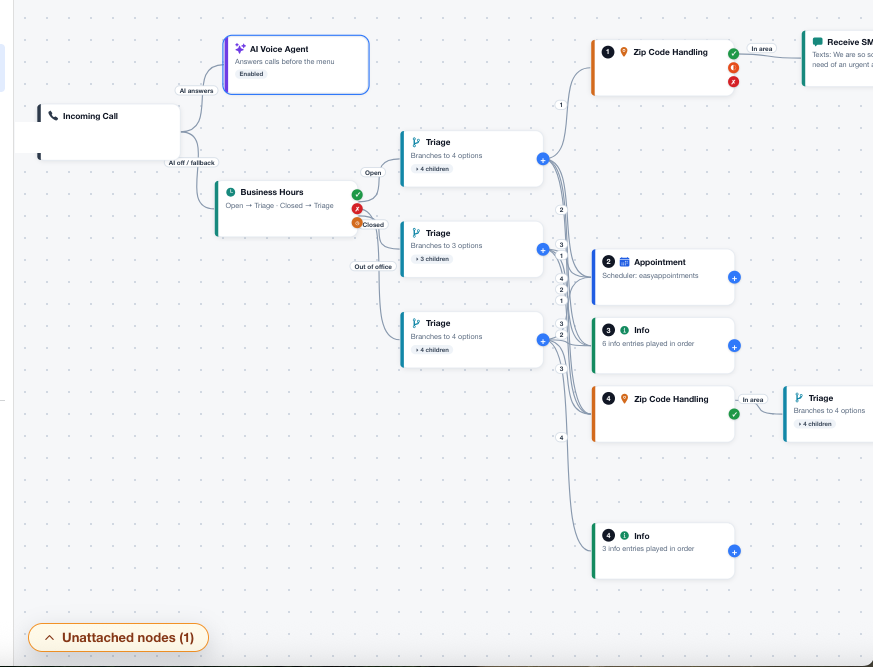
- Open Assistant in the portal — it opens directly to the Phone Tree 2.0 builder, with no separate assistant list in the account captured here. Start with the root triage — the first menu callers hear.
- Add one option per caller need: availability, services/pricing, callback.
- For each option, write the exact spoken script. Read it out loud; if you stumble, a caller will too.
- Add a repeat option (usually 0) so callers can hear the menu again without starting over.
Step 3 — Test every key
- Call your number and press each key, in order.
- Check that each option ends somewhere useful — an appointment, an info script, a message, or a transfer — never a dead end.
- Fix any script that is longer than about 30 seconds. Long scripts lose callers.
Tip: Put the most common request first. For most appointment businesses that is availability, not a general company description.
Checklist
- Greeting written and under 30 seconds
- Three or four clear options
- Repeat option included
- Every option tested by a real call